The whole plugin is built around one uncomfortable fact: an AI agent connected to your site can do things, and you need to stay in control of what those things are. Most of the design follows from taking that seriously. This is a walk through the governance model, piece by piece, so you can see why it is shaped the way it is.
Off by default
Nothing this plugin serves is exposed when you install the plugin. Not one ability. You switch them on individually, and until you do, the agent has nothing to call. This is deliberate. A tool that ships with everything enabled asks you to remember to turn things off, which is the wrong default for anything an agent can reach. Starting from zero means the surface only grows when you decide it should.
There is a second half to this that is easy to miss: an update never switches on a tool it serves. If a new version adds abilities, they arrive off, the same as everything else. You do not come back from an upgrade to find the agent can suddenly do more than it could yesterday. One thing an update can change is the MCP Adapter’s default server, which other plugins publish tools to. Settings has a switch for it, set to Automatic on update, and tools on that server are outside this plugin’s controls.
Least privilege by design
When the agent connects, it connects as a real WordPress user through OAuth or an Application Password. It is never handed an admin-equivalent key. You choose which account: with an Application Password you name it up front, and over OAuth the agent takes whichever account approves the connection in the browser, so approve while logged in as the account you want the agent to be. That user’s capabilities set the ceiling for everything the agent can do. If the user cannot publish, the agent cannot publish. If the user cannot manage other users, that door is closed too.
This is why the plugin nudges you toward a dedicated, low-privilege account for the agent. The credential type is not the safeguard. The user’s capabilities are. Pick a narrow user and the agent is narrow by construction, before any other control comes into play.
Two-layer capability gating
Here is the part that does the quiet heavy lifting. Access is checked in two separate places, not one.
The first layer is discovery. When a client lists the available tools, it only sees the plugin’s own tools that its user is allowed to run, which keeps the agent from wasting attempts on things that would be refused anyway. Tools bridged from other plugins are the exception: since 1.7.8, a bridged tool whose own check needs an item id lists for anyone who can edit posts, and the source plugin decides each call.
The second layer is execution. Before any ability actually runs, the plugin re-checks the user’s capability. Discovery being filtered does not mean execution is trusted. Both gates are enforced, so a call that slips past one still meets the other. Two independent checks are harder to get wrong than one.
Bounded by construction
Some limits are not toggles you set. They are baked in. The plugin runs no arbitrary code. Since 1.7.4 it will fetch one thing, an image from an HTTPS URL, and only through an ability you switch on yourself, which refuses private and loopback targets and follows no redirects. There is no open option or meta write, so an agent cannot poke at arbitrary settings. Post meta writes are limited to an allowlist of keys. Deletes go to Trash where WordPress supports it, so a mistake can be recovered rather than being final. And the last remaining administrator account can never be removed, no matter what the agent asks. These are floors, not preferences, which means you cannot accidentally configure your way underneath them.
An honest audit log
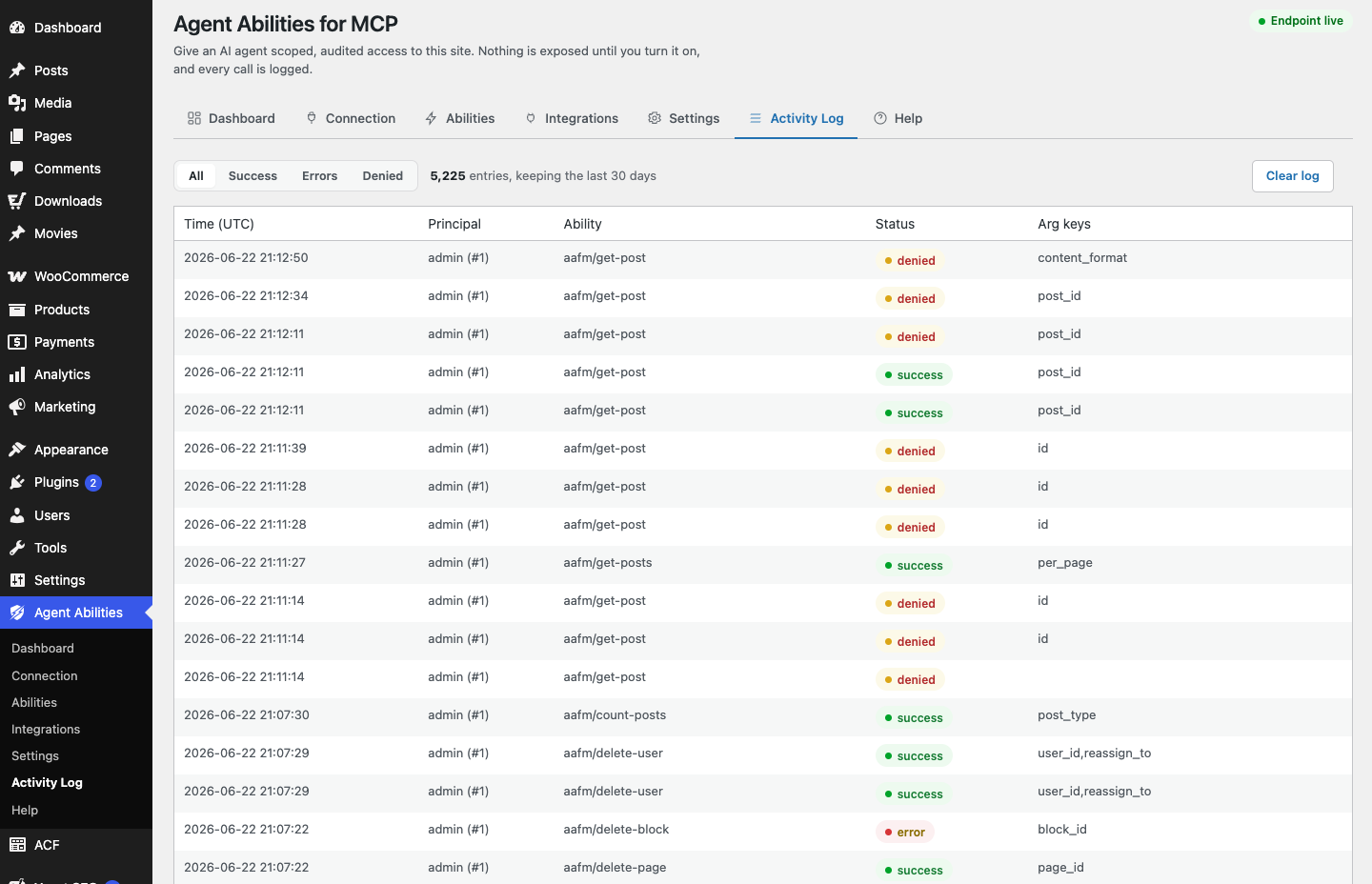
Every call to this plugin’s tools is written to a log in your own database. Not just the successful ones. Refused attempts are recorded too, so you can see what an agent tried to do and was stopped from doing, which is often more useful than the list of things that worked. Each entry carries the principal, the connection it came through, the argument keys, the source IP address, how long the tool ran, and a short note of what it touched, identifiers only such as ids and slugs, but never free-text content, so the log stays useful without hoarding the sensitive content that passed through it. A refused call also records why it was refused, in the admin log only and never in the message the agent sees. The log lives in your WordPress database, under your control. It is not sent anywhere, and you can search it, filter it and export it from the admin screen.
Optional guards on top
Beyond the built-in floors, there are extra controls you can switch on when you want them. A per-minute rate limit. An IP allowlist. A force-to-draft mode that keeps new content from going live. A cap on title length. Since 1.9.0 there are also optional alerts, an admin notice or an email when an app connects, a high-risk tool runs, denied calls burst, or a safety switch changes. All of them are off until you set them, in keeping with the rest of the model. They are there for when your situation calls for a tighter leash, not imposed on everyone by default.
No AI provider, no telemetry
Underpinning all of it: the plugin contacts no AI provider and sends no telemetry, and no site content leaves on its own. Your AI client connects in. What the plugin does send is limited, and each piece is something you switch on or click: the alert emails, which never include call content, a user name or an IP address, the Connection tab’s checks of your own site when you click the button, and the off-by-default URL upload fetch. Whatever the plugin records stays with you.
The point of all this
Read together, these pieces are not a pile of separate features. They are one stance. You should be able to let an agent work on your site and still answer three questions at any moment: what is it allowed to do, what did it actually do, and what did it try that got refused. Off by default, least privilege, two-layer gating, and the audit log are how the plugin makes those questions answerable. That is the whole idea, and everything else is in service of it.