Least privilege connection
The agent signs in as a real WordPress user through OAuth or an Application Password, never an admin-equivalent key.
Home / Features
What it does, and what it refuses to do
Agent Abilities for MCP is a free WordPress plugin that runs a governed MCP server on your site, and the abilities are only half of it. The other half is the layer that decides whether a call is allowed to run: capability checks, an audit log, rate limits, and hard limits that hold no matter what the agent asks.
Each one is a rule the plugin holds for you, not a setting you have to remember to turn on. Green means reads, amber means guarded writes, blue means the machinery that gates everything.
The agent signs in as a real WordPress user through OAuth or an Application Password, never an admin-equivalent key.
Nothing this plugin serves is exposed on install. You switch on one ability at a time, and an update never switches on a tool it serves.
A connection only sees the plugin’s own tools that its user can run, and every call re-checks that capability before it runs.
Every call to the tools it serves is logged in your own database, denials included with the reason, identifiers only. Search and filter it, export what you filtered, and turn on email alerts if you want to hear about risky calls.
Writes stay conservative. Deletes go to Trash where WordPress supports it, and the last administrator can never be removed.
Read content across WordPress core, plus a single site-wide search that spans every post type.
Add a per-minute rate limit, an IP allowlist, force-to-draft mode, or a title-length cap. All off until you set them.
The plugin calls no AI provider and sends no telemetry. Your client connects in, and the optional alert emails never carry call content.
Runs on the WordPress 6.9 Abilities API and the official MCP Adapter. No custom transport of ours in the path.
These hold whether an agent calls one ability or a hundred. None of them depend on the agent behaving well.
The agent connects as a real WordPress user, never an admin-equivalent key, and gets only that account’s capabilities.
Nothing this plugin serves is exposed until you enable it, and an update never switches on a tool it serves.
A connection only sees the plugin’s own tools that its user can call, and every call re-checks that capability before it runs.
Every call to the tools it serves is logged in your own database, denials included with the reason why, identifiers only and never free-text content. Search it, filter it and export it.
No arbitrary option or meta access, and no code execution. Deletes go to Trash where supported, and the last administrator can never be removed.
The plugin contacts no AI provider and sends no telemetry. Your AI client connects in, and no site content goes out on its own.
Discovery and execution are checked separately. Seeing a tool and being allowed to run it are two different permissions.
The plugin's own tools are listed only to users whose capabilities allow them. Bridged tools from other plugins whose own check needs an item id list for anyone who can edit posts, and the source plugin still decides each call.
Filtered at connect time
Before an ability executes, the plugin checks that user's capability again. A tool that slipped through, or a permission that changed, is caught here, not trusted from the first check.
Re-checked on every call
Why two layers: a single check at discovery is easy to work around. Re-checking at execution means the agent never gets more reach than the WordPress user you bound it to, even if it asks for it directly.
Every call to the plugin's own tools is recorded, including the ones it refused. Each row says who made the call, which connection it came through, which argument keys it passed and what it touched, using identifiers rather than the content itself. The log is a table in your own database.
principal=editor  connection=Claude
tool=create-post  keys=[title, status]
result=ok  duration=83 ms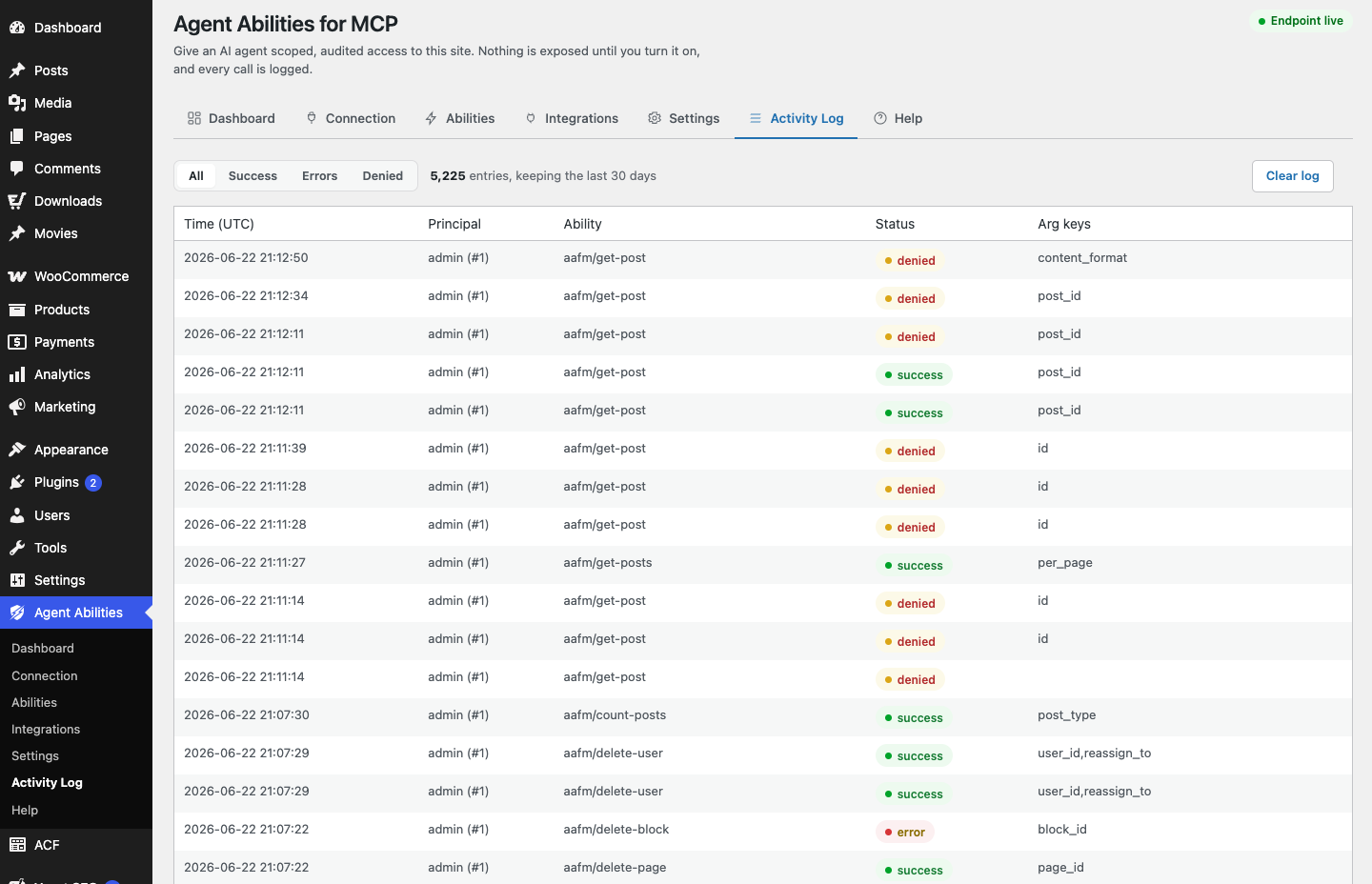
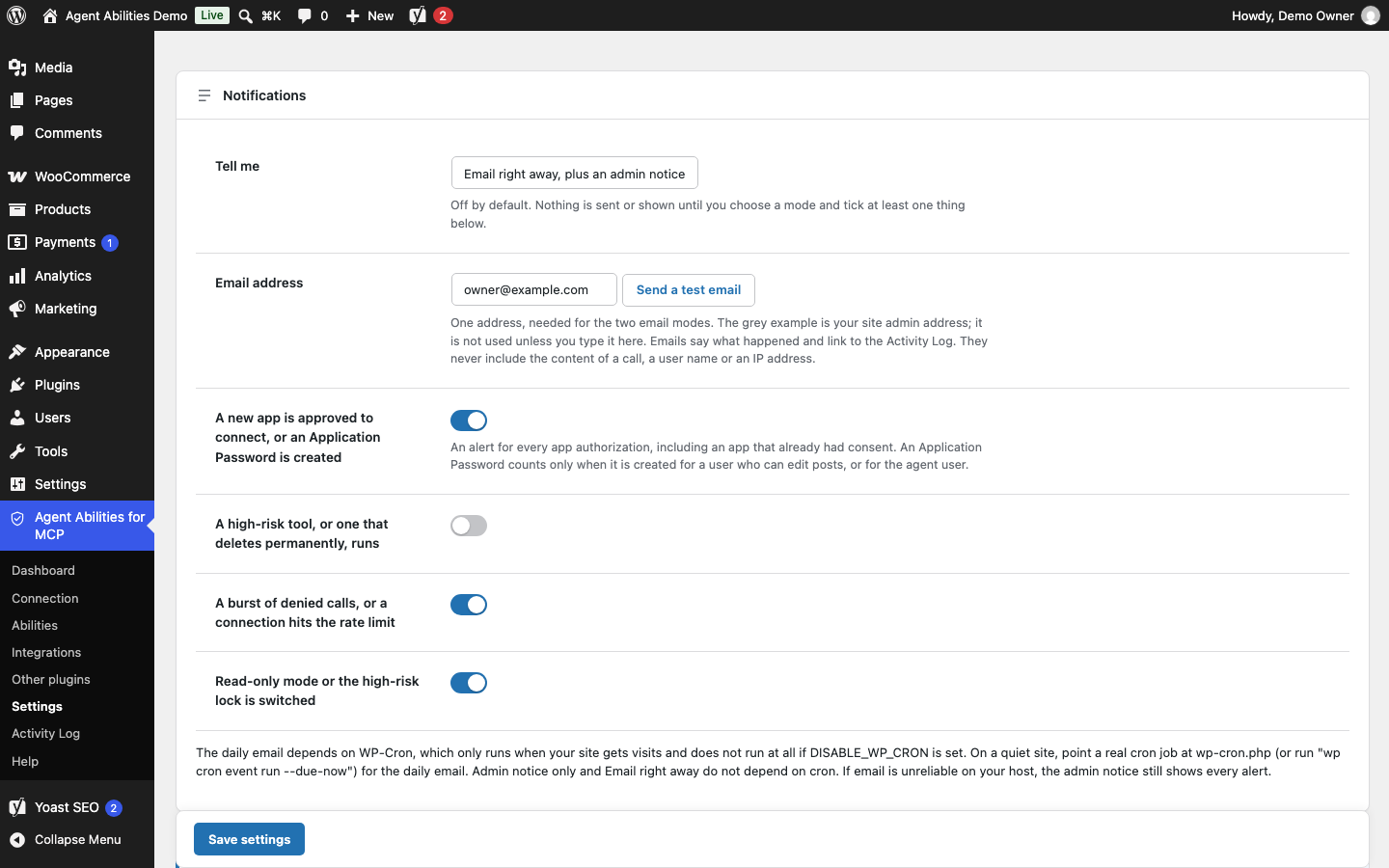
Pick an admin notice, an email right away or one daily email, then choose the events you care about: a new app or an Application Password for someone who can edit posts or for the agent user, a high-risk or permanent-delete run, a burst of denied calls or a rate-limit hit, and read-only mode or the high-risk lock being switched. Each kind sends at most one email per 15 minutes.
The emails go out through WordPress's own mail and never include call content, a user name or an IP address. The daily email needs WP-Cron. How alerts work, or set up alerts, step by step.
The connection signs in as a real WordPress account, through OAuth or an Application Password, and its reach is exactly that account's reach. Over OAuth that account is whichever one approves the connection in the browser, so approve while logged in as the account you want the agent to be.
Point the agent at a dedicated low-privilege user and it can only do what that user can do. Every call to its tools that follows is re-checked against that same account and written to the log.
The whole governance layer as one catalog, grouped by what it protects. Each row carries the same least-privilege badge you see in the console.
| Access | |
|---|---|
| Scoped user identityRead only | The agent authenticates as a real WordPress user you pick through OAuth or an Application Password, never an admin-equivalent key. |
| Filtered discoveryRead only | A connection only lists the plugin’s own tools that its user is allowed to run. Bridged tools from other plugins whose own check needs an item id list for anyone who can edit posts, and the source plugin still decides each call. |
| Per-call capability checkGuarded write | Before an ability runs, the plugin re-checks that user’s capability. Discovery and execution are gated separately. |
| Writes | |
| Guarded writesGuarded write | Writes stay conservative and every one is capability-checked. There is no arbitrary option or meta write. |
| Deletes go to TrashGuarded write | Where WordPress supports it, deletions move items to Trash rather than removing them for good. |
| Last administrator protectedDenied | The last remaining administrator account can never be removed, whatever the agent asks. |
| No code executionDenied | The plugin runs no arbitrary code. The only fetch it makes for a call is an image from an HTTPS URL, and only through an ability you switch on yourself. |
| Data | |
| No content leaves your siteRead only | The plugin contacts no AI provider and sends no telemetry. Optional alert emails never include call content, a user name or an IP address. |
| Personal-data integrations gatedGuarded write | WooCommerce and ACF can reach real personal data, so they sit behind a clear admin notice before you enable them. |
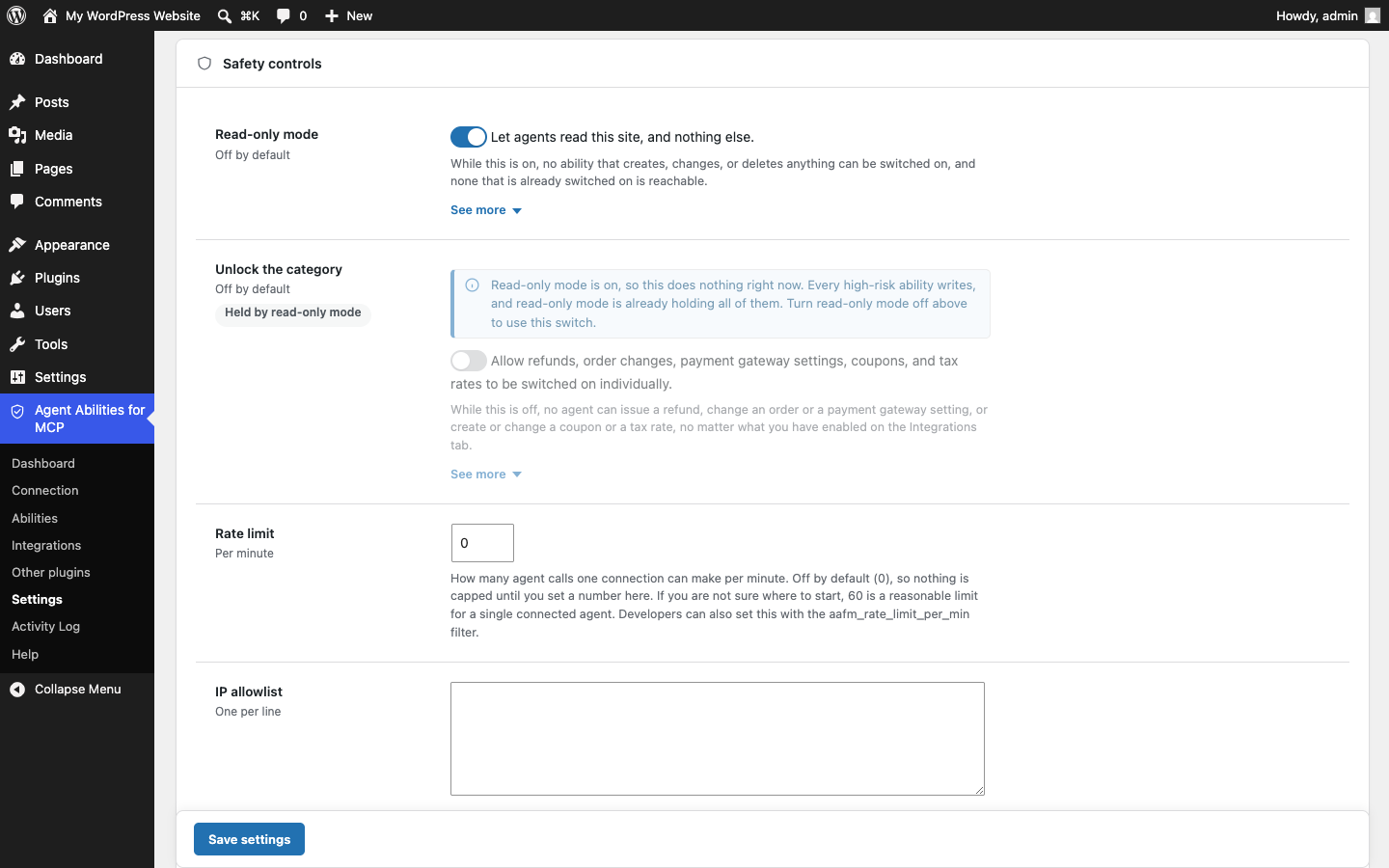
| Rate limit and IP allowlistOff until enabled | Add a per-minute rate limit or an IP allowlist. Both stay off until you set them. |
| Force-to-draft and title capOff until enabled | Force new content to draft, or cap title length. Optional guards, off until you turn them on. |
| Audit | |
| Every call to its tools loggedRead only | Each call is recorded in a table in your own database, with the principal and the argument keys. |
| Denials logged tooDenied | Refused attempts are written to the same log with the reason they were refused, so you can see what an agent tried to do and why it was stopped. The agent never sees that reason. |
| Alerts, off by defaultOff until enabled | An admin notice, an email right away or a daily email when an app connects, a high-risk tool runs, calls are denied in a burst, or a safety switch changes. Nothing is sent until you choose a mode. |
| No free-text storedRead only | The log keeps argument keys and the identifiers a call touched (ids, slugs, statuses), never free-text content like a post body or email, so it stays useful without hoarding sensitive data. For a failed call to another plugin’s bridged ability it also keeps that plugin’s error code, never its message. |
| Governance changes loggedRead only | Switching an ability on or off and changing a setting are logged like calls are, with a detail line naming what changed. |
| Filter and exportRead only | Filter the log by successes, errors, or denials, and export what you are looking at as a CSV. |
On top of capability gating, you can add extra limits. They are opt-in, so nothing here narrows access without you asking for it.
One switch on the Settings tab, and none of the write tools this plugin serves register as MCP tools, whatever you have ticked. A blocked write is missing from the agent’s tool list rather than refused when it calls. Abilities bridged from your other plugins are covered too, each judged by that plugin’s own annotation, and anything that declares neither way counts as a write and stays out. Tools that another plugin publishes straight to the default server of the MCP Adapter are not covered.
Turning the mode on enables nothing by itself, and turning it off enables nothing either, so your selections are where you left them when you switch back. The switch is written to the audit log. New in 1.6.0.
Nine WooCommerce abilities move money or grant authority. Enabling one is not enough on its own: they stay locked until you also switch on a separate high-risk control in Settings, and that switch is itself written to the audit log.
Covers refunds, order status, order updates, customer updates, payment gateway settings, coupon creation and updates, and tax rate creation and updates. New in 1.5.0.
179 abilities ship in the plugin, and every one of them starts off. Guardrails like these tighten the ones you do enable.
Some limits are not settings you could relax. They are missing from the plugin on purpose, so no agent and no configuration can reach past them.
There is no custom transport of ours in the path. The plugin rides on WordPress standards, and your AI client connects in.
Runs on the WordPress 6.9 Abilities API and the official MCP Adapter (no custom transport).
Free on WordPress.org, no paid tier, no API key to buy, no usage limits.
Requires WordPress 6.9+ and PHP 7.4+
The same guardrails do not stop at this plugin's own abilities. When another active plugin registers WordPress abilities, you can bring them in under the same rules.
Abilities from other plugins
When another active plugin registers its own WordPress abilities, this plugin can expose them as governed MCP tools, off by default and gated like everything else. It is a dynamic set that depends on the plugins you run. Every bridged ability is off by default, runs as the connected user, is checked by its source plugin on every call, and is written to the same audit log.
See how bridging worksInstall it, keep everything off, and switch on one ability at a time as you build trust. The guardrails hold on every call to its tools, not just the first.
Least privilege by default. Every call to its tools capability-checked and logged.