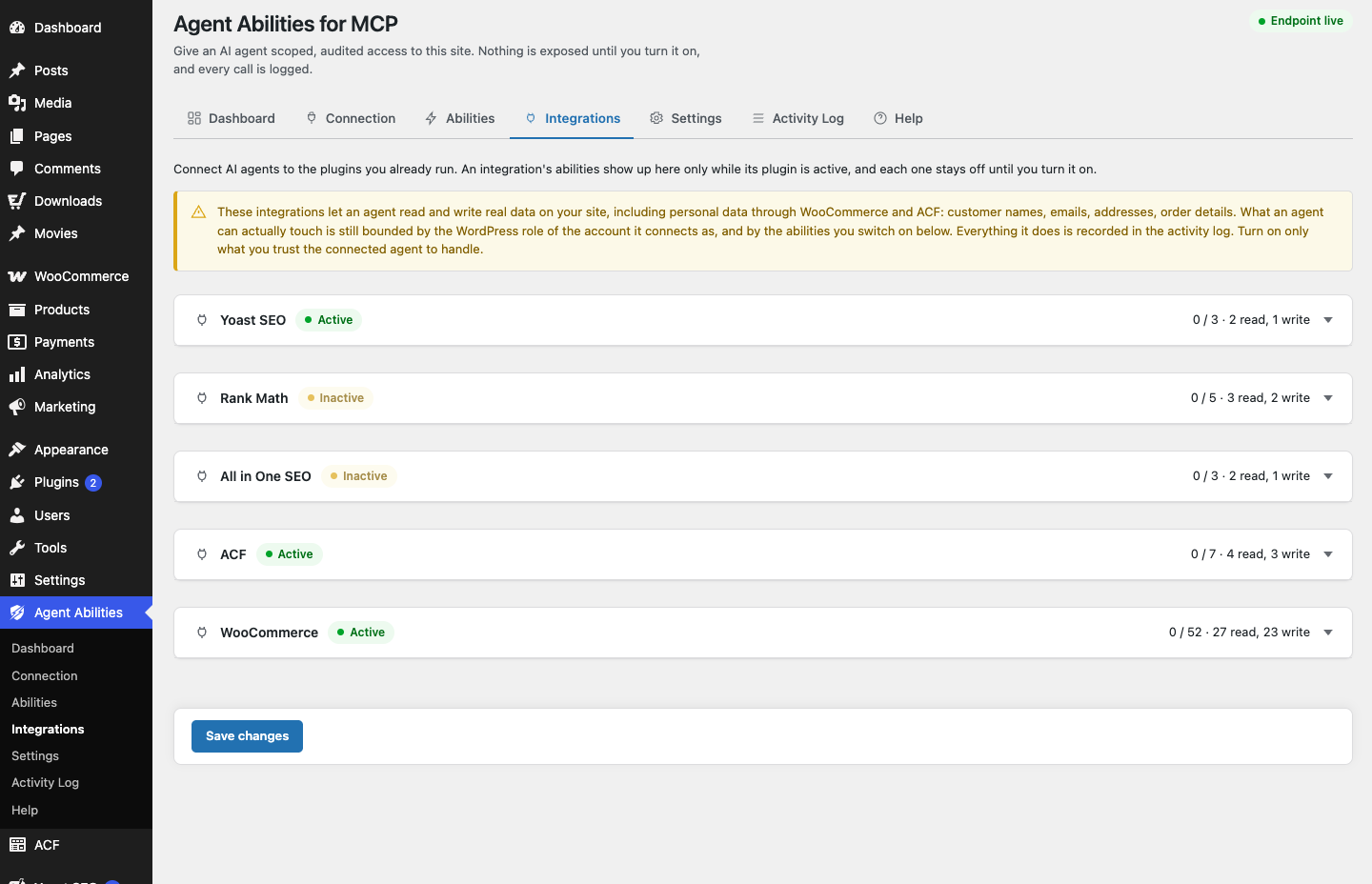
WooCommerce is where an AI agent gets genuinely useful and genuinely risky at the same time. Useful, because a store is full of repetitive lookups and updates an agent can help with: check an order, summarise recent sales, update a product description. Risky, because the same abilities reach real personal data, and orders and customers are not something you want an agent treating casually. The plugin’s answer is not to keep WooCommerce out of reach. It is to make sure the store stays governed the same way everything else does, with a bit of extra caution where personal data is involved.
The integration is real, and it is gated
The WooCommerce integration is the largest one the plugin ships, with 52 abilities covering products, orders, and customers. Those abilities only appear when WooCommerce itself is active, and like everything else they start switched off. Because some of them touch real personal data, they sit behind a clear admin notice before you enable them. The plugin is not pretending that reading a customer record is the same as reading a blog post. It flags the difference and makes you opt in with your eyes open.
Point the agent at a limited user
The first control is the same one that governs the rest of the plugin: the agent connects as a WordPress user, and that user’s capabilities are the ceiling. For a store, think hard about what that user should be. An agent that helps you understand sales does not need to be able to refund orders. An agent that tidies product copy does not need to read customer addresses.
Create the account for the job in front of you, not for every job it might ever do. Every ability re-checks the capability before it runs, so a user without a capability simply cannot exercise it, no matter how the request is phrased.
Enable abilities to match the task
With the user scoped, enable only the WooCommerce abilities that task needs. Everything is off until you switch it on, so you are assembling a small, purpose-built set rather than opening the whole 52 and hoping for the best. Helping with product listings? Enable the product abilities and leave orders and customers off. Answering questions about recent orders? Enable what that needs and nothing more. The narrower the set, the smaller the surface, and the easier it is to reason about what the agent could possibly do.
Guarded writes and hard floors still apply
Everything the plugin bakes in for core applies here too. Writes stay conservative and every one is capability-checked. There is no arbitrary option or meta write, no remote URL fetch, and no code execution. Deletes go to Trash where WordPress supports it, so an accidental removal can be recovered rather than being final. These are not settings you configure. They are floors the agent operates above whether it likes it or not.
The audit log matters more here
For a store, the audit log stops being a nice-to-have. Every call is recorded in your own database, refused attempts included, with the argument keys but never the values. That last detail is worth sitting with: the log tells you an order was read without storing the customer’s details inside the log itself. So you get a real trail of what the agent did with personal data, without the log quietly becoming a second copy of that data. If the agent tried something it was not allowed to do, the refusal is there too.
Add the optional guards for a busy store
The optional controls earn their keep on a store. A per-minute rate limit keeps an agent from hammering your order endpoints. An IP allowlist restricts where the connection can even come from. Both are off until you set them, so you turn them on when your situation calls for it. For anything customer-facing and high volume, they are worth the two minutes it takes to configure them.
Nothing leaves your site
One reassurance that matters especially for commerce data: the plugin contacts no AI provider and no external service, and makes no outbound requests of its own. Your AI client connects in and calls the abilities you enabled. The plugin never reaches out, and it sends zero telemetry. Your customer data does not get shipped anywhere by the plugin as a side effect of connecting an agent.
The store stays yours
Running WooCommerce with an agent does not mean handing over the store. It means letting the agent work within a user you scoped, on abilities you enabled, above floors it cannot cross, with a log recording every move and the personal-data abilities flagged before you ever switch them on. The agent gets to help with the store. You keep the store.